Publié le
Le nouveau backoffice pour les marques Orderchamp
Contributeurs

Orderchamp
Lire en 4 min
In this article
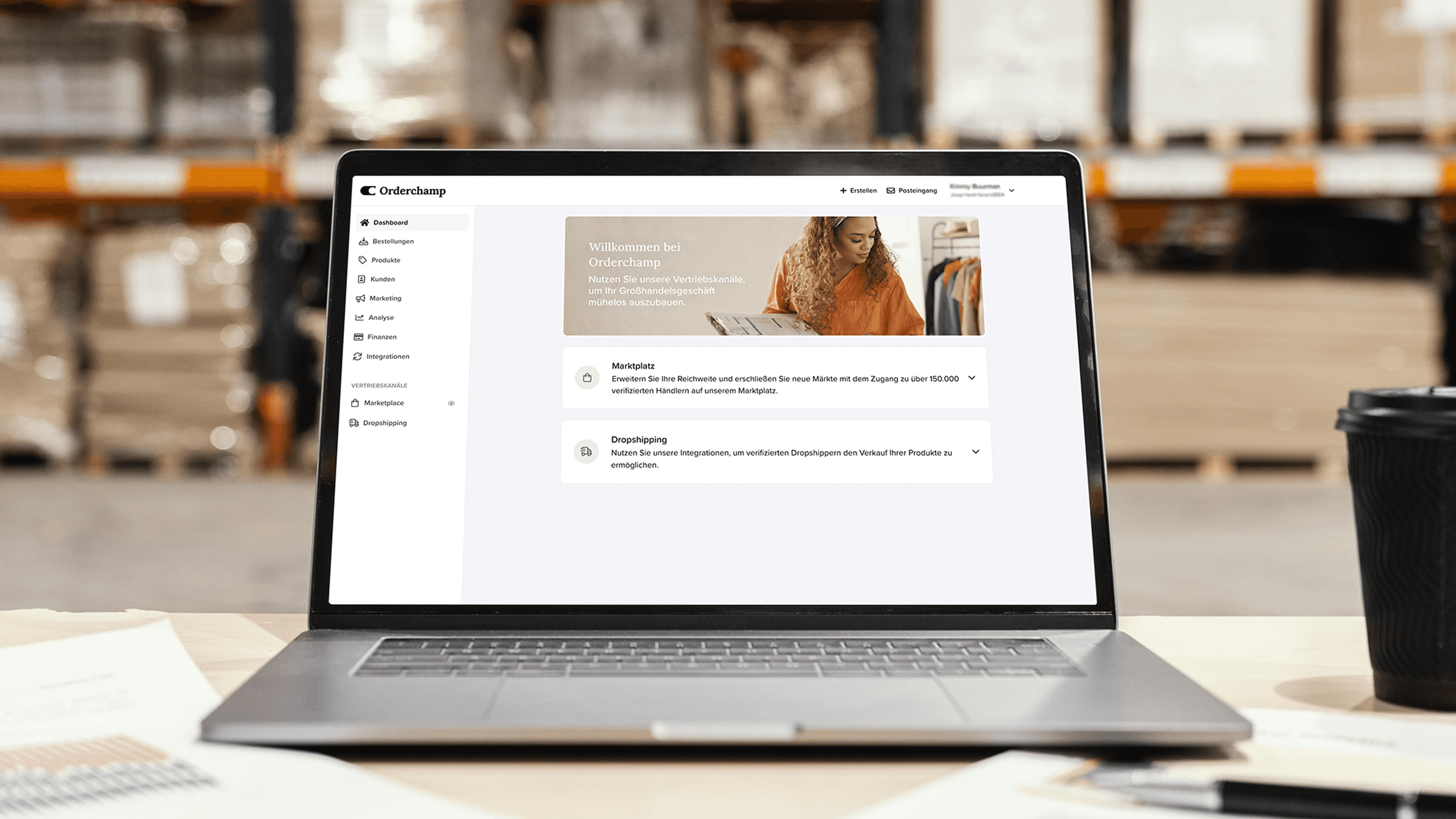
Découvrez le nouveau backoffice multicanal d'Orderchamp, conçu pour gérer facilement tous vos canaux de vente en gros, accroître l'efficacité de votre entreprise et évoluer avec vous. Plongez-y pour découvrir les mises à jour et fonctionnalités les plus importantes !
En 2019, Orderchamp a commencé avec l'idée de donner aux détaillants indépendants et aux marques la possibilité de se connecter en dehors du modèle traditionnel de vente en gros en créant un Marketplace de vente en gros en ligne. Depuis, nous avons ajouté 7 000 marques et 150 000 détaillants à notre communauté mondiale et avons introduit de nombreuses fonctionnalités pour aider nos marques à développer leur activité plus efficacement sur Orderchamp. Grâce au backoffice d'Orderchamp, les marques peuvent gérer leur vitrine & leurs informations produit, créer & exécuter des commandes pour leurs clients, s'intégrer à notre solution Dropshipping, synchroniser leur catalogue produits directement depuis leur système e-commerce et bien plus encore.
À mesure que notre solution devient plus complexe et que nos ambitions grandissent, nous avons commencé à dépasser les limites du backoffice. Notre backoffice a été conçu comme une console permettant aux marques de gérer leur présence sur Marketplace et leurs commandes, ce qui rend difficile l'intégration de nouvelles solutions comme Dropshipping by Orderchamp dans une conception monicanale. C'est pourquoi nous avons repensé le backoffice des marques afin d'accueillir intuitivement toutes nos solutions de vente en gros, avec de la marge pour évoluer à l'avenir grâce à une mise en page évolutive.
Présentation du backoffice multicanal
Avec des projets passionnants en préparation, nous sommes revenus aux bases en examinant notre interface pour voir où nous pouvions la rendre plus adaptable et plus conviviale. En ce qui concerne le backoffice des marques, nous avons identifié trois exigences clés :
Prise en charge de plusieurs canaux de vente
Davantage d'accent sur les éléments en attente et les actions rapides
Des outils pour améliorer les performances
Prise en charge de plusieurs canaux de vente
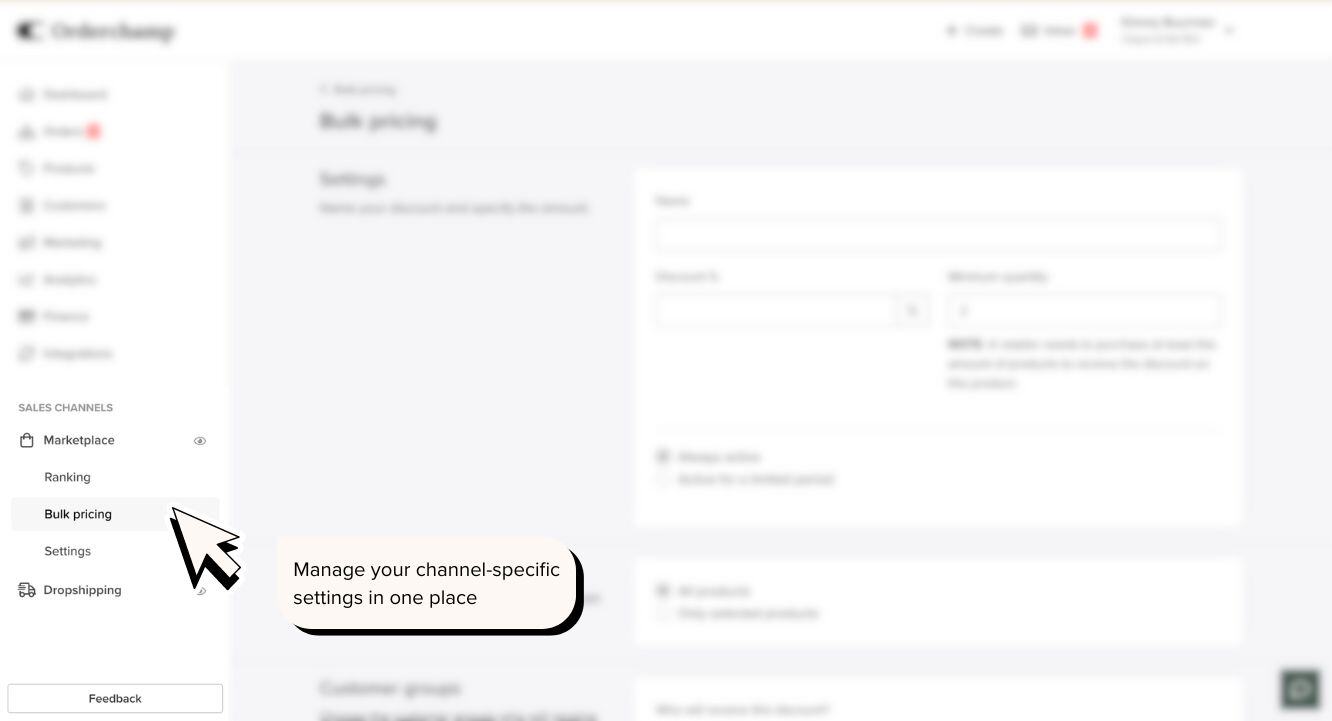
Nous proposons actuellement deux canaux de vente permettant aux marques de vendre leurs produits à des clients B2B : Marketplace et Dropshipping. Chaque canal s'accompagne d'un ensemble unique de configurations et de fonctionnalités, comme la mise en place de prix de gros pour votre vitrine Marketplace et l'activation d'une distribution sélective pour votre solution de dropshipping.
C'est pourquoi nous avons créé une nouvelle section dédiée dans le backoffice pour vos canaux de vente. Dans cette section, vous pouvez configurer et gérer directement le canal de vente, depuis les paramètres spécifiques au canal jusqu'aux ensembles de fonctionnalités propres à ce canal de vente. Le reste des éléments du menu contient les paramètres universels pour gérer les commandes de tous les canaux de vente d'Orderchamp. Cela permet de trouver plus facilement et plus rapidement les informations dont vous avez besoin.
Davantage d'accent sur les éléments en attente et les actions rapides
La page principale du backoffice, connue sous le nom de tableau de bord, a également été remaniée. Nous avons supprimé les informations superflues et mis l'accent sur les éléments les plus importants afin que vous puissiez obtenir un aperçu rapide des performances de vos canaux sans devoir explorer les différentes sections du backoffice. Le tableau de bord a été divisé en trois sections principales :
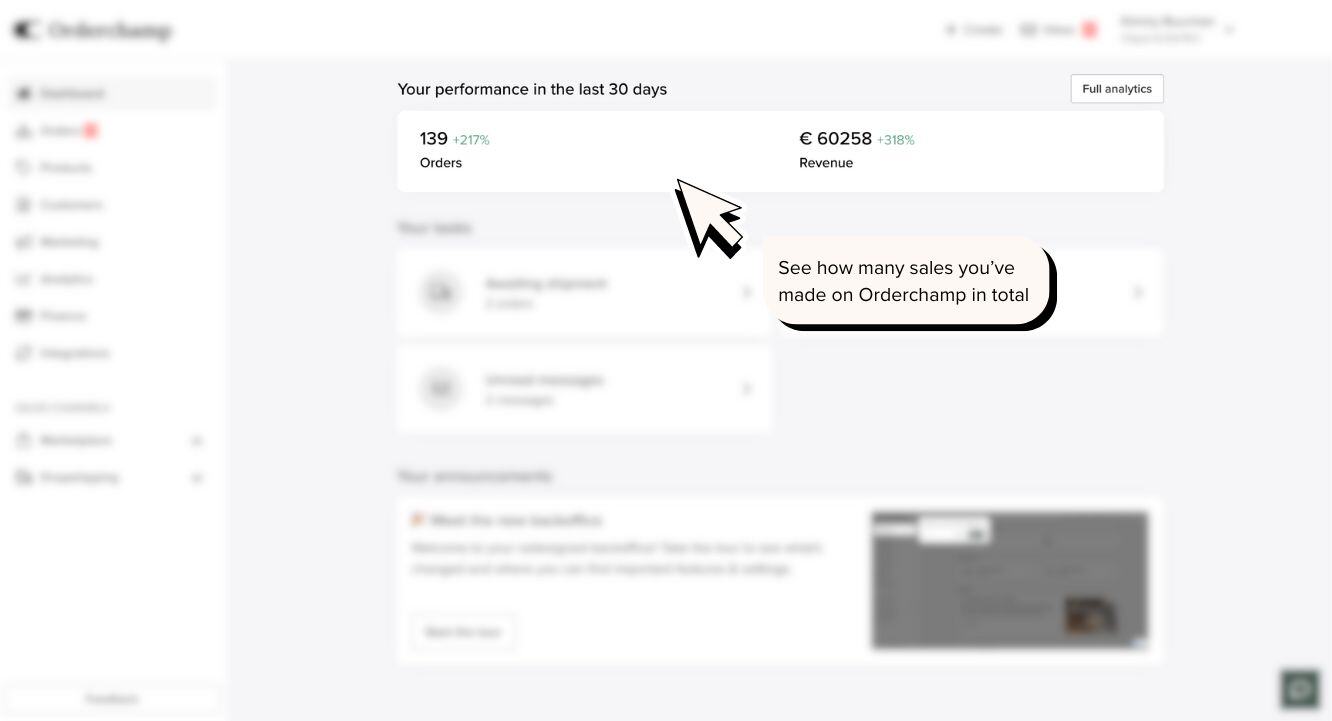
Votre Vue d'ensemble des performances vous offre un aperçu de l'évolution de vos commandes et de votre chiffre d'affaires pour tous les canaux de vente d'Orderchamp au cours des 30 derniers jours. Vous pouvez approfondir les différentes métriques ventilées par canal de vente dans la section Analytics.
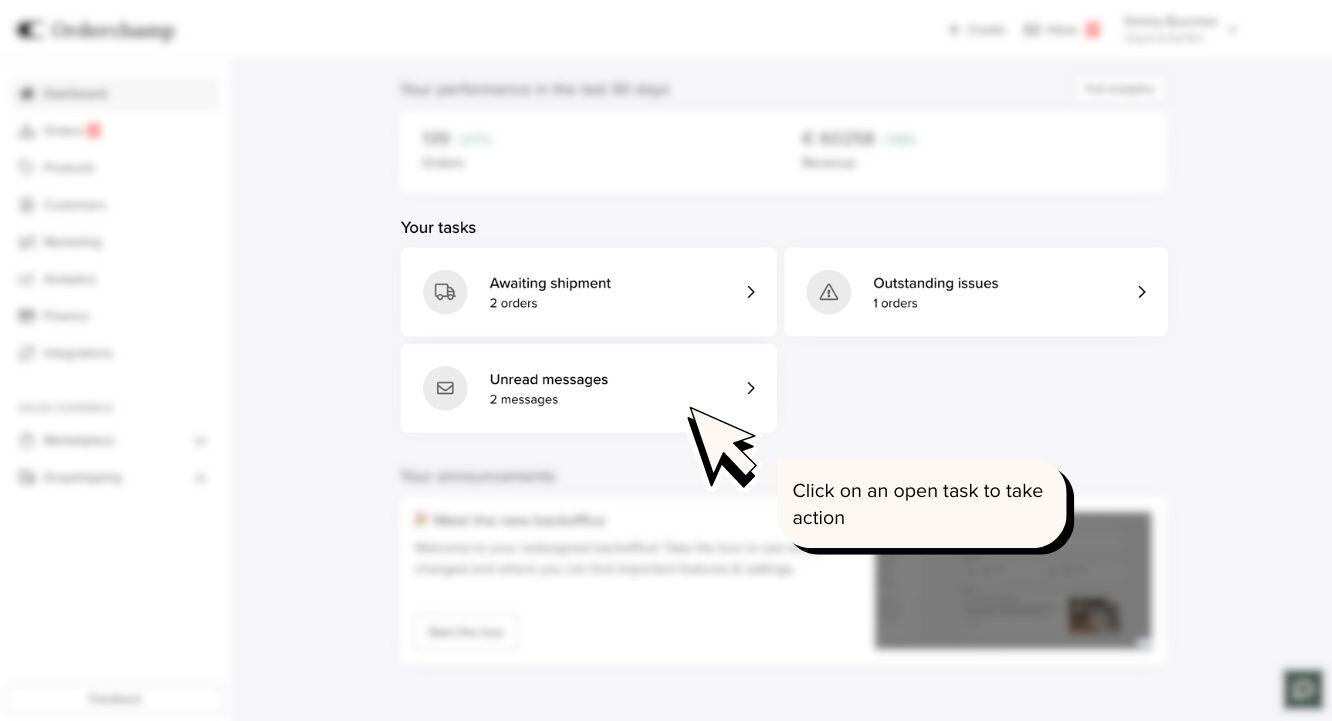
La section Tâches ouvertes vous montre les actions en attente qui nécessitent votre attention, comme les commandes non confirmées, les messages non lus, les problèmes de commande signalés, etc.
Dans Annonces, vous pourrez consulter les mises à jour importantes des produits, les nouvelles fonctionnalités et les prochains événements Orderchamp. Cette section remplace la boîte de réception, les mises à jour et la bannière de notification présents dans l'ancien design du tableau de bord.

Des outils pour améliorer les performances
L'une des questions qui nous est souvent posée est : « Comment puis-je augmenter la visibilité de ma vitrine pour obtenir plus de ventes ? » Naturellement, en tant que marque, votre priorité est de générer des commandes et de favoriser de nouvelles relations clients. C'est pourquoi nous introduisons une nouvelle système de recommandations dans la section Marketing, qui vous fournit des conseils opportuns et concrets sur la manière d'interagir avec vos clients et d'augmenter vos commandes via vos canaux de vente Orderchamp. Nous avons également introduit une nouvelle section Classement dans le canal Marketplace afin que vous puissiez vous comparer à des marques similaires et agir pour améliorer votre classement Marketplace.
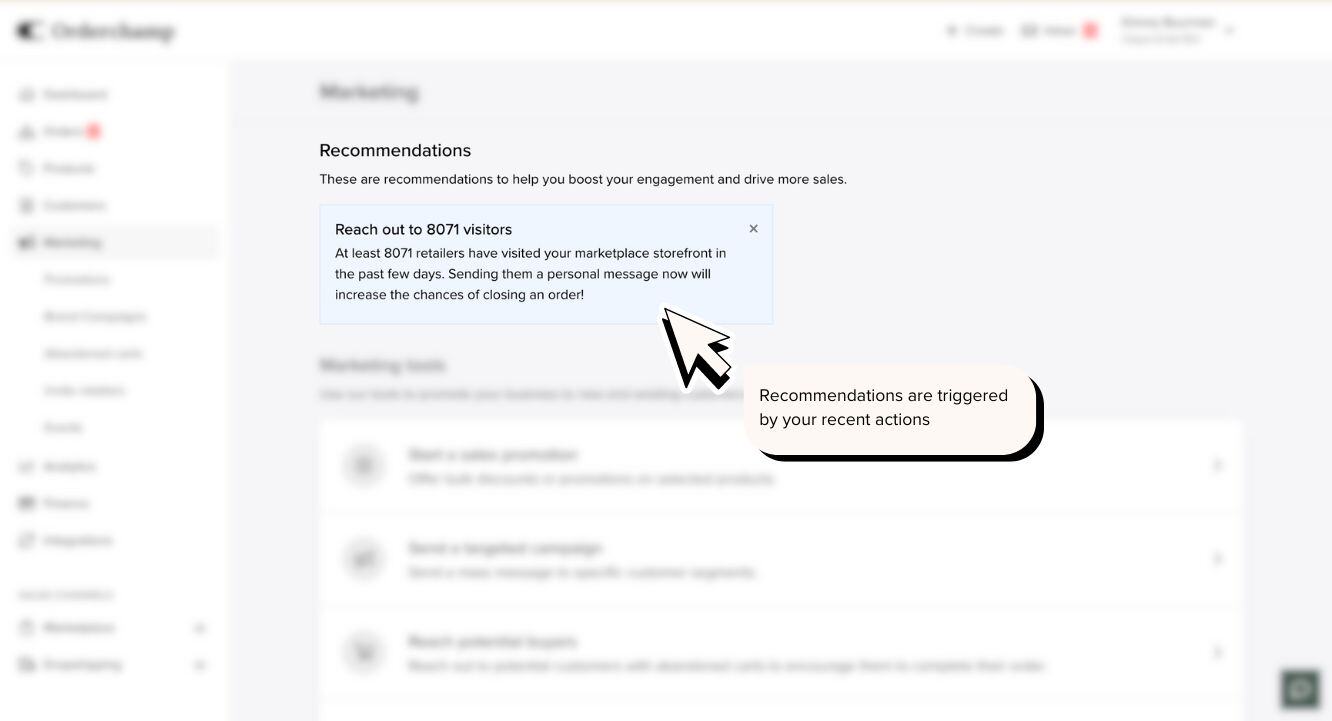
Recommandations
Dans la section Marketing, repensée, vous trouverez tous les outils nécessaires pour développer votre activité, depuis l'envoi de messages groupés à des clients (prospects), le ciblage de vos paniers abandonnés, la mise en place d'offres promotionnelles et bien plus encore.
Les recommandations sur la page d'accueil Marketing sont déclenchées en fonction de vos actions. Ainsi, si, par exemple, vous ajoutez une nouvelle collection de produits, vous pouvez recevoir une recommandation vous invitant à envoyer une campagne de marque à vos clients et abonnés pour les informer de votre nouvelle collection. Chaque recommandation est exploitable et peut vous aider à améliorer vos performances grâce à un outil marketing. Voyez cela comme votre assistant marketing, qui repère pour vous les opportunités d'améliorer vos performances et trouve l'outil adapté pour y parvenir !
Classement
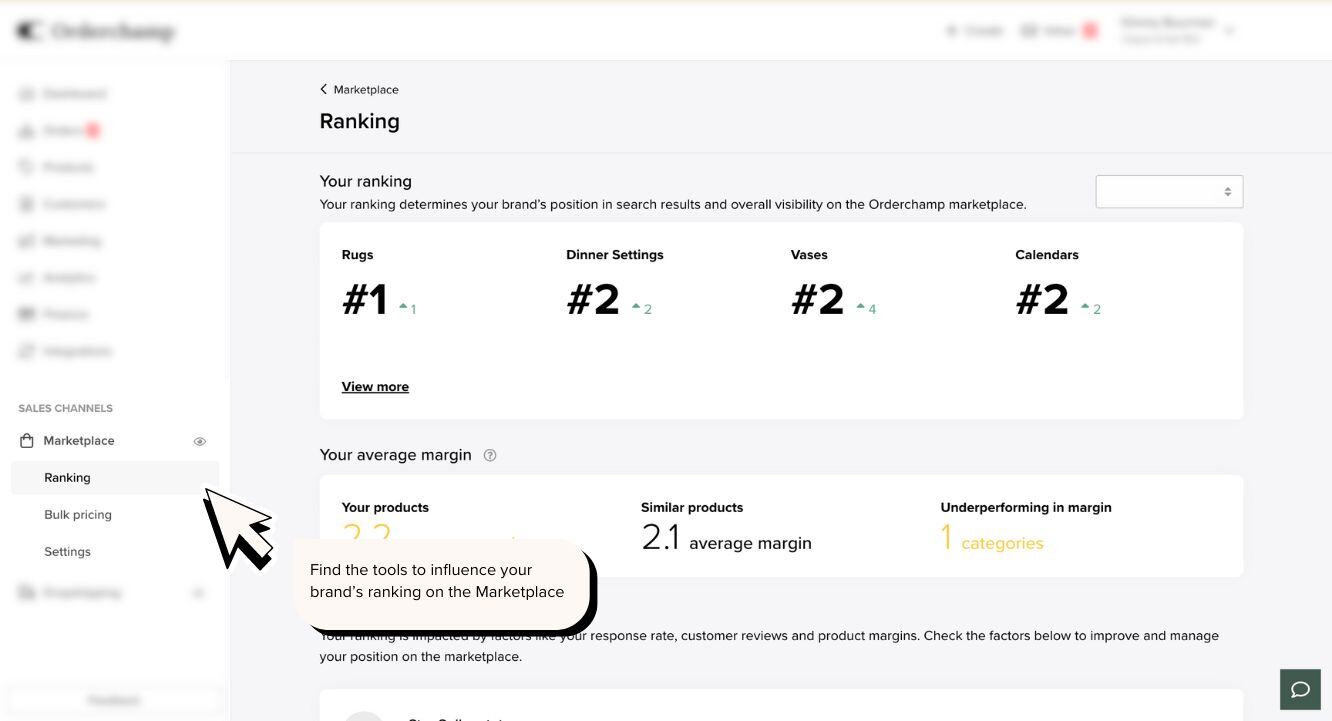
Dans la nouvelle section Classement du canal Marketplace, vous verrez le rang de votre marque dans les différentes catégories Marketplace, la façon dont vos marges se comparent à celles des autres et les outils que vous pouvez utiliser pour améliorer les deux. Vous pouvez utiliser le filtre de vitrine en haut de la page pour consulter votre classement Marketplace par vitrine. Les facteurs de classement en bas de la page sont des sections exploitables que nous vous encourageons à utiliser pour influencer la visibilité de votre marque sur Marketplace.
Avec une nouvelle configuration pour une utilisation multicanale, un tableau de bord plus ciblé et des ressources pour développer votre activité, nous avons repensé le backoffice afin d'en faire un outil intuitif pour renforcer vos décisions commerciales. Grâce à une vue plus rationalisée, vos actions importantes ne sont plus qu'à un clic, et il est désormais encore plus facile pour toute personne de votre organisation d'apporter des modifications rapidement et en toute confiance. Le nouveau design facilite également la prise en charge de plusieurs canaux de vente comme Marketplace, le dropshipping et bien plus encore à l'avenir ! Consultez la section suivante pour obtenir la liste complète des changements.
Modifications apportées au backoffice
Paramètres du compte : les paramètres généraux tels que les profils utilisateurs et les informations de l'entreprise ont été déplacés vers le menu supérieur lorsque vous cliquez sur votre nom
Navigation : le menu a été divisé en deux sections, l'une pour les aperçus généraux et les outils de tous vos canaux de vente Orderchamp, et l'autre pour la gestion des paramètres spécifiques à chaque canal de vente
Tableau de bord : le tableau de bord a été simplifié en 3 sections principales afin de vous offrir un aperçu rapide des mises à jour importantes, des actions et des indicateurs de performance
Abonnements & contrats : tous les abonnements et contrats de vos différents canaux de vente se trouvent désormais dans la section « Finance »
Gestion de la vitrine : vos vitrines sont désormais gérées dans la section Canal de vente, ce qui facilite les modifications de vos vitrines Marketplace ou de dropshipping. Pour consulter votre vitrine, cliquez sur l'icône en forme d'œil à côté du nom du canal de vente
Boîte de réception : la boîte de réception pour échanger avec les clients a été retirée du menu latéral et se trouve désormais dans le menu supérieur pour un accès rapide
Exports : il existe désormais une page d'export dédiée dans chaque section où vous pouvez créer un export, par exemple : Produits, Commandes et Invitations
Page de performance : cette page a été remaniée et vous pouvez désormais suivre vos performances Marketplace dans la section Classement du canal Marketplace
Marge des produits : la performance de votre marge par rapport aux autres marques/catégories sur la Marketplace a été déplacée vers la section Classement du canal Marketplace
Garantie du meilleur prix : cette fonctionnalité a été déplacée vers la section Classement du canal Marketplace
Acheteurs potentiels : « Acheteurs potentiels » a été renommé « Paniers abandonnés » et se trouve désormais dans la section « Marketing »
Dropshipping : les fonctions de dropshipping sont désormais regroupées dans le canal de vente Dropshipping : gérez facilement votre vitrine de dropshipping, vos produits, vos demandes d'accès et vos tarifs
Expédition et retours : vous pouvez désormais gérer vos préférences d'expédition et de retour par canal de vente dans leur section Paramètres
Analyses clients et produits : ces données ont été supprimées pour le moment, mais un aperçu de vos meilleurs clients sera réintégré à la page Analytics ultérieurement
Informations sur les détaillants dans les paniers abandonnés : pour des raisons de confidentialité, certaines informations sur les détaillants ne seront plus affichées lorsque vous enverrez un message à un détaillant ayant un panier abandonné, comme son site web, son identifiant Instagram et son adresse complète
Avec le nouveau design du backoffice, nous espérons que les marques pourront trouver les informations et agir dessus beaucoup plus rapidement. L'introduction d'une approche multicanale nous permettra également de faire évoluer et d'enrichir les solutions Orderchamp en fonction des besoins de nos marques. Grâce aux retours continus et ouverts de notre communauté, nous avons pu évoluer d'une marketplace de vente en gros en ligne vers une solution de vente en gros multicanale pour aider les marques à vendre de différentes manières. La collaboration est l'une de nos valeurs fondamentales chez Orderchamp, c'est pourquoi nous invitons toutes nos marques à explorer le nouveau backoffice et à nous laisser leurs commentaires.
Le backoffice repensé n'est qu'un début, alors restez à l'affût de nouvelles sorties passionnantes à venir !
Inscrivez-vous pour vendre
Orderchamp vous offre la meilleure plateforme pour vous développer au-delà des frontières nationales et entrer en contact avec notre communauté de 150 000 détaillants indépendants.
Éssayez Orderchamp Cloud


Découvrez si Orderchamp Cloud passe pour ton entreprise
Planifiez les prochaines étapes
Découvrez Orderchamp Sales App : transformez chaque moment de vente en commande
Annonces
Orderchamp
Lecture de 5 min

Comment conclure davantage de commandes de gros lors des visites commerciales
Stratégie de vente en gros
Orderchamp
5 min de lecture
L'essor du commerce de gros en libre-service : comment les détaillants préfèrent acheter aujourd'hui
Perspectives du secteur
Orderchamp
5 min de lecture