Published on
Wholesale order automation: a simple step-by-step guide
Contributors

Orderchamp
5 min read

In this article
Wholesale orders can arrive through B2B portals, email, PDFs, spreadsheets, EDI and sales representatives.
The goal of wholesale order automation is not to force every customer into the same channel. It is to bring these different orders into one reliable process with less manual work.
Here is how to approach it step by step.
Step 1: Map how orders arrive today
Start by listing every channel customers currently use to place orders.
This may include a B2B portal, email, PDF purchase orders, Excel files, EDI, phone calls, sales representatives and marketplaces.
For each channel, note how many orders it generates, how long processing usually takes and where mistakes happen most often.
A simple overview is enough:
Order source | Monthly volume | Manual effort | Error risk |
|---|---|---|---|
B2B portal | High | Low | Low |
High | Medium | Medium | |
Medium | High | High | |
Excel or CSV | Medium | Medium | Medium |
EDI | High | Low | Low |
The purpose is to identify which channels create the most work, not just which generate the most orders.
Step 2: Find the biggest manual bottleneck
Next, look at what happens after an order is received.
The problem may be entering SKUs into the ERP, matching customer product codes, checking prices or sending order information to the warehouse.
Focus on the task that causes the most delay or errors.
For example, if portal orders are already structured but still need to be copied into the ERP, the main issue is integration.
If customers send many different PDF and spreadsheet templates, the main issue is order entry.
Understanding the real bottleneck prevents you from choosing software that solves the wrong problem.
Step 3: clean the data behind the process
Automation only works well when product, customer and pricing data is reliable.
Review product SKUs, customer accounts, price lists, payment terms, stock data and delivery information before connecting new systems.
Pay particular attention to duplicate customer records and old product codes. If a customer still uses a discontinued SKU, decide how it should be matched with the current product.
You should also decide which system is responsible for each type of data. The ERP may manage stock, while a PIM manages product information and the ordering platform manages customer-facing catalogues.
Clear data ownership reduces conflicts later.
Step 4: Choose the right ordering method for each customer
Not every customer needs the same ordering experience.
Regular independent retailers may prefer a B2B portal where they can browse products, view their pricing and repeat previous orders.
Large retail groups may need to send orders through EDI or files generated by their own procurement systems.
Customers working with long product lists may prefer uploading a spreadsheet directly into a cart.
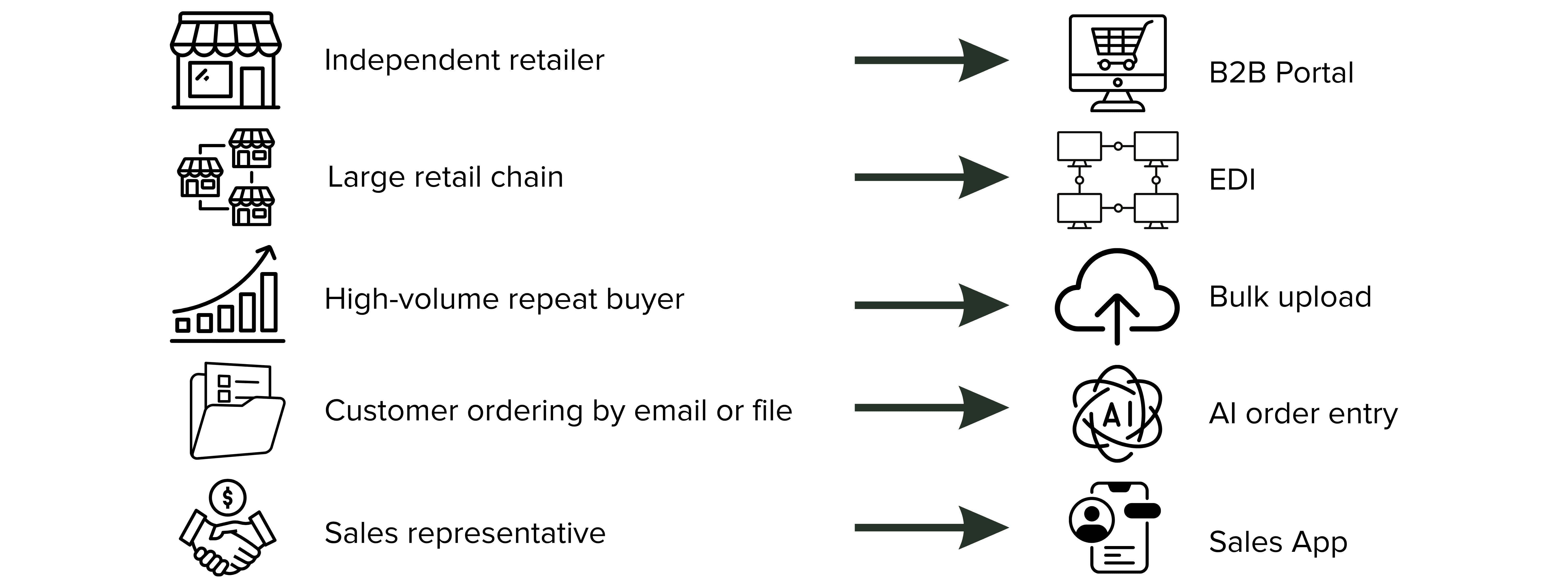
The most effective strategy is usually a combination of channels. Customers keep the method that suits their business, while the supplier standardises what happens after the order is submitted.
Step 5: Connect direct orders to your operational systems
Orders placed through a B2B portal are already structured, but the process is not fully automated if someone still has to re-enter them elsewhere.
Connect the ordering environment with the systems responsible for inventory, invoicing and fulfilment.
This may include an ERP, warehouse management system, accounting platform or fulfilment partner.
The integration should transfer the information needed to process the order, such as the customer, products, quantities, prices, discounts, delivery address and payment method.
Test the connection with a small number of orders before rolling it out more widely. The aim is to make sure the same order data moves through the business without being typed several times.
Step 6: Automate orders that still arrive through email and files
Some customers will continue sending purchase orders by email, PDF, Excel, CSV or XML.
These orders do not need to remain manual.
AI order entry software can extract product codes and quantities, match them with the supplier’s catalogue and create a structured draft order.
An employee can then review any uncertain or unmatched information before confirming it.
This approach is particularly useful when customers use different order templates. Instead of creating a separate import format for every account, the software can interpret a wider range of documents.
Customers who want to order through the portal but already have a prepared list can also use bulk order upload. Their SKUs and quantities are matched and added directly to the cart for review.
Step 7: Measure and improve the workflow
Once automation is in place, compare the results with the original process.
Track:
Manual processing time
Order-entry errors
Percentage of orders requiring review
Time between receiving and confirming an order
Percentage of orders placed digitally
A basic calculation can show the size of the opportunity:
30 manual orders per day
× 8 minutes per order
× 5 working days
= 20 hours of order entry per week
Also review which orders still require manual intervention.
If the same outdated SKU appears repeatedly, add a matching rule. If price conflicts occur often, review how price lists are maintained. If many uploaded files fail in the same way, improve the file instructions or product data.
Automation should become more accurate as these recurring exceptions are resolved.
Common mistakes to avoid
Choosing software before mapping the process: Start with the operational problem, not the feature list.
Automating inconsistent data: Incorrect product or customer information will continue causing errors after automation.
Launching a portal without integrations: A digital order still creates manual work if it must be copied into another system.
Forcing every customer into one channel: Some customers have procurement processes that cannot easily change.
Removing human review too early: Unmatched products, unusual quantities and pricing conflicts may still require attention.
What to look for in wholesale order automation software
The right software should support the full order process rather than one isolated task.
Relevant capabilities may include:
B2B portal ordering
Customer-specific pricing and catalogues
ERP and warehouse integrations
EDI support
AI document processing
Bulk order upload
Product and customer matching
Approval workflows
Exception reporting
API access
The best setup is the one that fits your customers, systems and order complexity.
Building a simpler wholesale order process
Wholesale order automation does not mean replacing every existing sales channel.
A customer may order through a portal, upload a spreadsheet, send a PDF or use EDI. What matters is that each order can enter a consistent internal workflow.
Start by understanding where manual work occurs. Then improve the process in stages by combining direct digital ordering, system integrations, AI order entry and bulk upload where they add the most value.
Orderchamp Cloud is one example of a platform that combines these capabilities within one environment. The same principles apply to any wholesaler reviewing how orders are captured, processed and transferred.
Frequently asked questions
What is wholesale order automation?

Where should a wholesaler start?
Can PDF purchase orders be automated?
What is the difference between EDI and AI order entry?
What is bulk order upload?
Can wholesale orders be synced with an ERP?
Does automation remove the need for human review?



How to get retailers to reorder before Christmas: a Q4 restock plan for wholesale brands
Industry insights
Orderchamp
6 min read

How to upscale and improve your product photos with AI
AI
Orderchamp
6 min read

What buyers actually look at when deciding to stock a new brand
Wholesale strategy
Orderchamp
6 min read