Published on
7 ways to customize your B2B Portal for smarter wholesale growth
Contributors

Orderchamp
5 min read
In this article
No two B2B businesses operate in exactly the same way. Your pricing may depend on customer agreements, order volume or country-specific margins. Your shipping rules may vary by weight, quantity or product type. Some customers may need access to exclusive collections, while others require specific payment terms before placing an order.
When these details are managed manually, B2B operations quickly become complex. Your sales team spends time checking exceptions, your customers wait for confirmation, and every order creates room for small but costly mistakes.
That is why B2B Portal customization matters.
With the B2B Portal by Orderchamp Cloud, brands can set up rules that match the way their business already works. Instead of forcing every buyer into the same buying journey, you can create a tailored wholesale experience with customer-specific pricing, catalogs, shipping conditions, payment terms and more.
Below, we’ll walk through 7 ways to customize your B2B Portal and build a buying experience that is easier to manage, easier to scale and more relevant for every customer.
1. Set customer-specific pricing
In B2B, pricing is rarely one-size-fits-all. Long-term customers, high-volume buyers, international retailers and strategic partners may all work with different commercial agreements.
Customer-specific pricing allows you to show the right prices to the right customers directly inside your B2B Portal. This helps you reward loyalty, support regional pricing strategies and manage negotiated agreements without relying on manual follow-up.
Instead of checking price lists, updating spreadsheets or confirming discounts by email, your pricing logic is built into the buying process from the start. Customers see the conditions that apply to them, while your team keeps more control over margins and consistency.
This is especially useful for brands that sell across multiple customer groups, regions or sales channels.
2. Encourage larger orders with volume-based pricing
Volume-based pricing is one of the most practical ways to increase average order value in wholesale. It gives retailers a clear reason to buy more, while helping your brand create stronger order commitments.
With volume-based pricing in your B2B Portal, you can create pricing tiers based on order quantities or product volumes. This makes bulk buying easier to understand and more attractive for customers.
You can use volume-based pricing to:
Reward retailers for placing larger orders
Increase average order value
Support better margin planning
Move inventory more strategically
Reduce the need for manual discount negotiations
For retailers, this creates transparency. They can immediately see the benefit of ordering more. For your team, it creates a more scalable way to manage pricing incentives.
3. Create custom promotions for selected customers or campaigns
Promotions are often most effective when they are targeted. A seasonal campaign, product launch or reactivation offer may not be relevant for every customer in your network.
With custom promotions, you can tailor offers inside your B2B Portal based on your commercial strategy. This gives your brand more flexibility to support specific campaigns without changing your entire pricing structure.
For example, you could create a temporary offer for selected retailers, support a new collection launch with an introductory discount, or offer better conditions to customers who have not ordered in a while.
This makes promotions easier to manage and more relevant for buyers. Instead of sending separate discount codes or manually correcting orders, the right conditions can be applied directly in the portal.
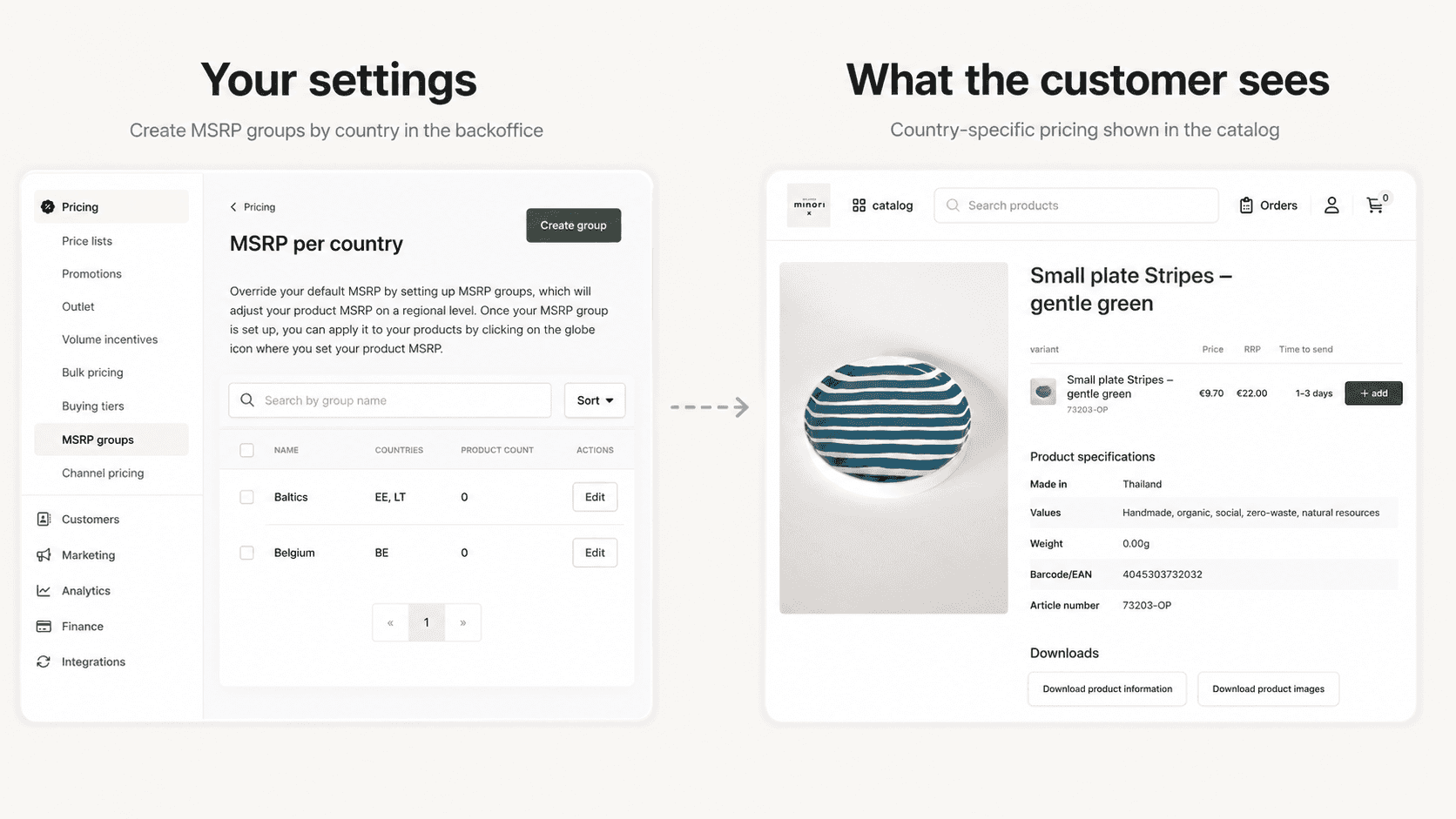
4. Manage MSRP by country
International wholesale selling often comes with different pricing expectations. Retail prices, margins, taxes, currencies and market positioning can vary from country to country.
That is why country-specific MSRP settings are valuable for brands selling across Europe or multiple international markets. By defining MSRP by country, you can give retailers clearer guidance while keeping your product positioning consistent.
This helps your customers understand how your products should be priced in their local market. It also gives your brand more control over how products appear across regions, especially when you want to protect positioning or avoid pricing confusion.
For brands with international ambitions, this type of B2B Portal customization supports more professional, market-specific selling.
5. Define flexible B2B shipping rules
Shipping is one of the areas where B2B ecommerce can become complicated fast. Some products are heavy, fragile or bulky. Some orders only become profitable above a certain value. Others may require minimum quantities before they can be shipped efficiently.
With customizable B2B shipping rules, you can define the conditions that fit your logistics setup. In your B2B Portal, shipping rules can be based on factors such as:
Number of units
Order value
Weight
Minimum quantity
This makes it easier to create shipping conditions that reflect your real operational costs. Retailers see the correct requirements during the buying process, while your team avoids unnecessary back-and-forth about minimums, surcharges or delivery conditions.
Clear shipping rules also help reduce friction at checkout. Buyers know what to expect, and your operations stay consistent as order volume grows.
6. Build customer-specific catalogs
Not every customer should see the same assortment. Some products may only be available in specific countries. Some collections may be reserved for selected retailers. Certain customers may have access to exclusive products, early launches or a curated range based on their store type.
Customer-specific catalogs give you control over product visibility inside your B2B Portal. This allows you to create a more relevant buying experience for each customer or customer group.
This is especially useful for brands that work with:
Selective distribution
Regional exclusivity
Customer tiers
Seasonal collections
Product launches
Different retail concepts
Instead of showing every product to every buyer, you can guide customers toward the assortment that fits them best. This makes the buying experience feel more personal and helps your sales strategy stay organized behind the scenes.
7. Customize payment terms and delivery expectations
Strong B2B relationships are often built on trust and flexibility. Some customers may pay upfront, while others work with agreed payment terms. Delivery expectations can also vary depending on product type, customer agreement or market.
With payment term rules and delivery settings, you can make these agreements part of the digital buying experience. Customers immediately see the terms that apply to them, and your team can reduce manual checks before processing an order.
You can also set delivery times per product or variant, which helps create clearer expectations for buyers. This is especially helpful when certain items are made to order, shipped separately or require longer lead times.
By customizing payment and delivery rules, your B2B Portal becomes more than a webshop. It becomes a structured sales environment that supports the way you already work with your customers.
Why B2B Portal customization is important
A good B2B ecommerce portal should not only display products and collect orders. It should support the operational reality behind wholesale selling.
That means giving brands the flexibility to manage pricing, catalogs, shipping, promotions and payment terms without adding more manual work. It also means giving retailers a buying experience that feels clear, relevant and professional.
When your B2B Portal is customized correctly, you can:
Reduce manual order handling
Prevent pricing and shipping mistakes
Offer more relevant buying experiences
Support stronger customer relationships
Scale across markets, customers and sales channels
Keep your team focused on growth instead of admin
For growing brands, this can make a major difference. The more your portal reflects your actual business rules, the easier it becomes to sell online without losing control.
Build a B2B Portal that works the way your business does
The B2B Portal by Orderchamp Cloud helps brands create a wholesale buying environment that fits their operations, customers and growth plans. From customer-specific pricing and catalogs to flexible shipping rules, payment terms and country-specific MSRP, you can customize the buying experience without adding complexity for your team.
Instead of managing every exception manually, your rules are built directly into the portal. This gives your customers a smoother way to order and gives your business a more scalable way to grow.
Ready to see how a customized B2B Portal could work for your brand?
Book a free demo of Orderchamp Cloud and discover how to turn complex B2B operations into a clear, automated buying experience.
Frequently asked questions
What is B2B Portal customization?

Why is customization important for B2B ecommerce?
Can I create customer-specific catalogs?
Can I set different payment terms for different customers?
Who should use a customizable B2B Portal?



EUDR 2026: What brands and suppliers actually need to do before 30 December
Industry insights

Orderchamp
5 min read

What to do when the trade show is over: 7 ways to turn leads into wholesale orders
B2B ecommerce
Orderchamp
5 min read

Get ready for the Orderchamp Digital Fair
Product & features
Orderchamp
5 min read